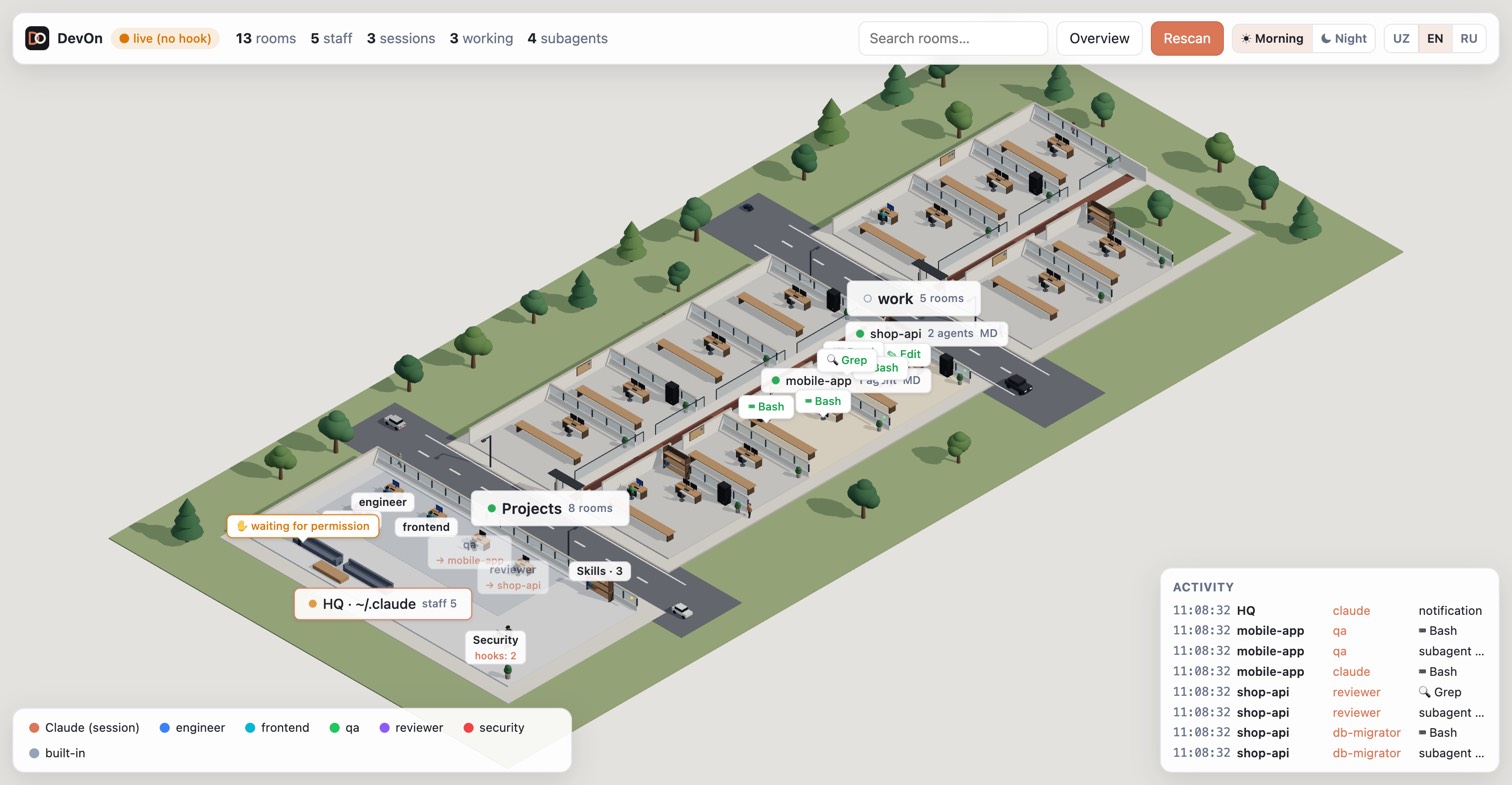
DevOn scans the Claude Code projects on your computer and draws them as a small town in the browser.
The whole town: buildings are folders, rooms are projects, and the activity feed shows what each session is doing.
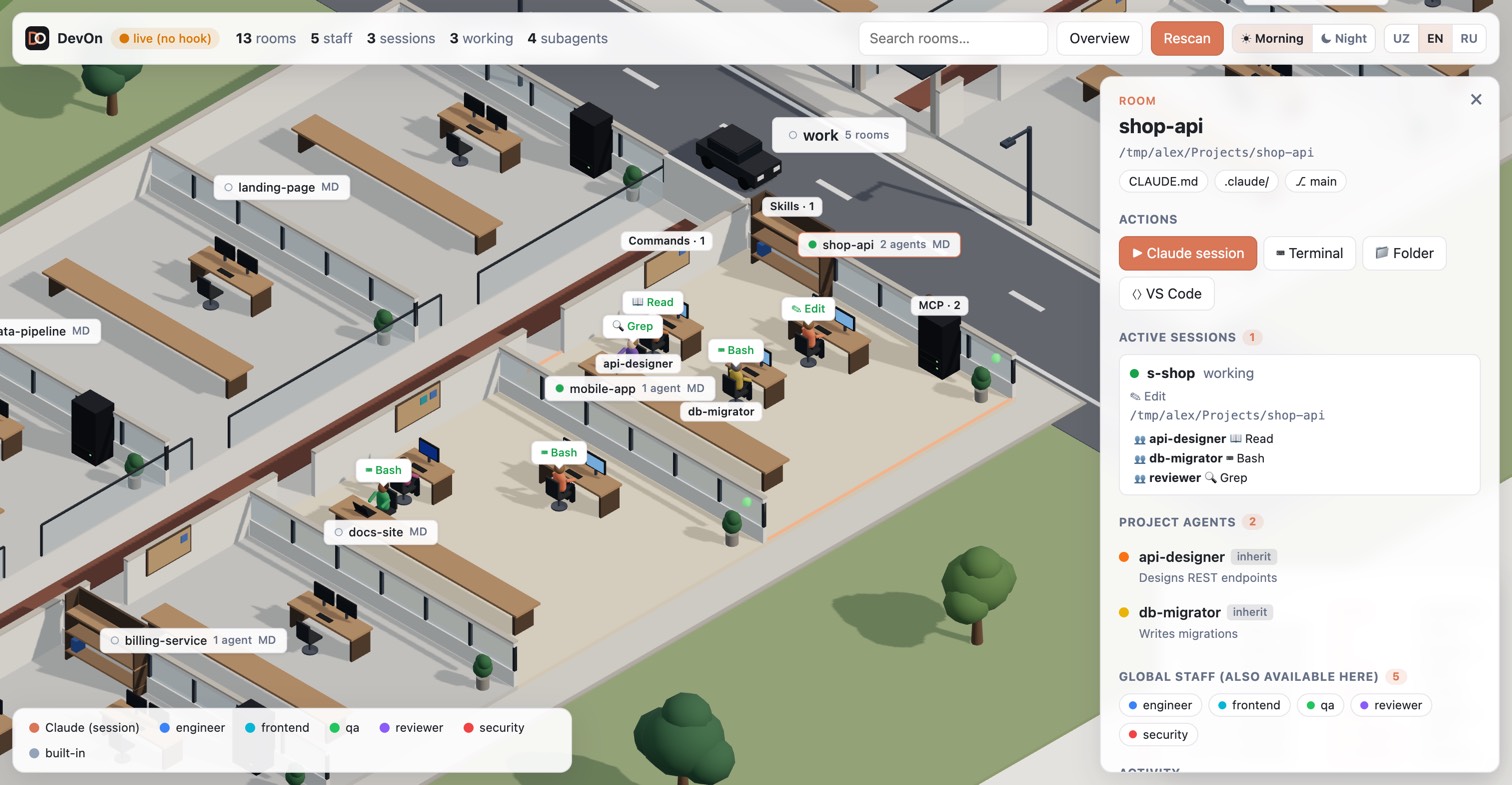
Every project is a room with a desk for Claude sessions, desks for the project's own agents and a meeting table for guests. Skills, MCP servers and commands appear as a bookshelf, a server rack and a notice board.
Every folder is a building. A folder holding several projects becomes a building with corridors; streets, cars and pedestrians run between buildings.
The lobby is your global ~/.claude: global staff agents, the skills shelf and hooks.
Live mode shows which room has a running session, which tool is in use, where a subagent went and who is waiting for permission.
Morning and night themes, and three languages: Uzbek, English, Russian.
Click a room to see its sessions, agents, skills and MCP servers, and to open a terminal or a new Claude session there.
DevOn listens only on 127.0.0.1. Nothing leaves your computer.
Install
One command installs DevOn, adds the devon command and starts it.
Downloads the DevOn package and verifies its SHA-256 checksum.
Looks for Node.js 20 or newer. If there is none, it downloads a private copy into ~/.devon/runtime; your system is not changed.
Adds the devon command to your PATH.
Starts DevOn in the background and opens http://127.0.0.1:4777.
From then on, open a terminal and type:
devon
Requirements
Supported
macOS
Intel and Apple Silicon
Linux
x64 and arm64 (glibc distributions)
Windows
Windows 10 (1803 or newer) and Windows 11
Claude Code
Installed and used at least once, so ~/.claude exists
Browser
Any modern browser with WebGL
Node.js
Optional. Version 20+ is reused if present, otherwise installed for you
How it works
DevOn is a small local web server plus a 3D page. It only reads Claude Code's own files; it does not talk to Claude or to any network service.
Claude Code files~/.claude, running sessions and your project folders
DevOn serverLocal process on 127.0.0.1:4777. Rescans every 60 seconds and streams live changes
Your browserDraws the town in 3D and updates it as sessions work
What is read, and why:
Source
Used for
~/.claude.json
The list of projects Claude Code has been used in
Scan folders
Projects that contain .claude/ or CLAUDE.md
.claude/agents, skills, MCP, commands
Desks and furniture in each room and in the lobby
~/.claude/sessions/*.json
Which sessions are running right now, and where
Hook events (optional)
Tool in use, subagents, waiting for permission
Installed files:
Path
Contents
~/.devon/app
DevOn itself (replaced on update)
~/.devon/runtime
Private Node.js, only if your system had none
~/.devon/bin/devon
The devon command
~/.devon/office.config.json
Your settings (kept on update)
~/.devon/devon.log
Server log
The devon command
Everything is managed with one command. Without arguments it is the same as devon start.
Command
What it does
devon
Start DevOn in the background and open it in the browser
devon stop
Stop the background server
devon restart
Stop, then start again
devon status
Show whether DevOn is running
devon open
Open the DevOn page in the browser
devon hooks install
Turn on the live hook (tools, subagents, permission waits)
devon hooks uninstall
Turn the live hook off
devon update
Download and install the latest version
devon uninstall
Stop DevOn, remove the hook and delete ~/.devon
devon version
Print the installed version
devon help
List all commands
Live hook
Sessions are visible without any setup. To also see tools, subagents and "waiting for permission", turn on the hook:
devon hooks install
It adds one entry to your Claude Code settings.json (a backup copy is written first) and leaves your other hooks alone. To remove it:
devon hooks uninstall
The hook is asynchronous, prints nothing and always exits with 0, so Claude Code is unaffected even when DevOn is stopped. It sends metadata only: event name, session id, folder, tool name and agent type. Never prompts, tool input or tool output.
Room actions
Click a room to open its panel. The Actions section can start things in that project's folder:
Action
macOS
Linux
Windows
Claude session
Terminal.app
Your terminal emulator
New console window
Terminal
Terminal.app
Your terminal emulator
PowerShell
Folder
Finder
File manager (xdg-open)
Explorer
VS Code
code or VS Code.app
code
VS Code
On Linux without a graphical session (SSH, containers) the window-opening buttons are disabled; the rest of DevOn keeps working.
Configuration
DevOn works without configuration. To change what is scanned, create ~/.devon/office.config.json: